Somewhere beyond Cambridge's postcard colleges is a place where a computer doesn't become obsolete when its maker stops selling it. It goes on a shelf, is carefully repaired, and eventually finds itself in front of another pair of curious hands. A child types into a keyboard their parents may recognise. A grown-up hears the electronic noise of a game they haven't played since the 1980s. The past isn't especially quiet here.
The Centre for Computing History, in Rene Court off Coldhams Road, is one of those museums you might miss while searching for Cambridge attractions because it isn't housed in a spectacular old stone building. Yet there's a compelling argument that some of the inventions inside changed more lives than anything in the city's grander galleries.

Why Cambridge is exactly the right city for this museum
Cambridge's computing story isn't simply the story of today's research labs or Silicon Fen startups. In the late 1970s, small groups of engineers were trying to make computers small, useful and inexpensive enough to bring home. The machines they built would end up in bedrooms, classrooms and eventually under the fingers of millions of children.
Acorn Computers was founded in Cambridge in 1978 by Chris Curry and Hermann Hauser. Its computers helped make the city a place where hardware wasn't just something studied in a university department. It was designed, built, sold, played with and argued over.
Across that world stood Clive Sinclair and his famously compact, relatively affordable machines. The Acorn versus Sinclair rivalry became part of British home computing folklore, but the important story isn't which logo won. It's that computing stopped being something owned only by corporations and institutions. Suddenly an ordinary person could buy a little machine and tell it what to do.
The BBC Micro: the classroom computer that wanted you to become its author
If you went to school in Britain in the 1980s, you may remember the BBC Micro's beige body and the distinctive black-and-red keys. The BBC's Computer Literacy Project wasn't only about watching experts on television. It wanted people to experiment. Acorn's BBC Micro, introduced in 1981, became the hardware side of a national invitation to understand computers rather than just consume their output.
The BBC Computer Literacy Project archive explains how broadcasting, education and government interest met the people building the machine. Its designers included Sophie Wilson and Steve Furber, names that will reappear in a much bigger technological story in a moment.
What makes an old BBC Micro interesting now isn't merely that its graphics look primitive. It's that you can see the machine's assumptions. You press a key and it responds. You type a command and the result is yours. There isn't a billion-dollar recommendation engine quietly deciding which screen you'd like next.
The museum's hands-on approach is important here. Where a particular computer is running and available for use, you can interact with the technology rather than looking through glass. Follow the instructions and be gentle with the hardware. These keyboards have survived an extraordinary number of fingertips.
Domesday, 1986: a million people left a message for the future
One of the museum's most extraordinary projects is about a computer that almost forgot a country. In the mid-1980s, the BBC set out to create a twentieth-century counterpart to William the Conqueror's Domesday Book. Schoolchildren and community groups gathered information about the places where they lived: photographs, local observations, changes to neighbourhoods, and what ordinary life looked like from their own front door. The result was a detailed picture of Britain compiled with the help of more than a million people.
To browse it, you needed much more than an ordinary book. The BBC Domesday Project combined the BBC Micro family, special hardware, interactive mapping and enormous analogue LaserDiscs, with contributions from Acorn, Philips and other collaborators. A map could lead you to a village, then to photographs and descriptions from the people who knew it. Long before most households had the internet, children were helping to create something that felt remarkably close to one.

Then came the catch. The pictures and words had been preserved on formats and equipment that were becoming increasingly difficult to find and repair. Saving the data wasn't enough; somebody also had to keep the means of reading it alive. The Centre for Computing History has maintained and restored three working Domesday systems and documents the preservation effort through its own BBC Domesday archive. A 40th-anniversary event in September 2026 brought attention back to the project. That event has passed, but the archival work has not.
It's a quietly emotional idea: thousands of children writing down details of places that have since changed, their words held on a futuristic disc that itself became an antique. The machines are beautiful and complicated, but the real treasure is the everyday life they were trying to keep. Without preservation, an entire generation's observations could have become harder to read than the medieval records that inspired them.
Sinclair's ZX Spectrum: rubber keys and astonishing imagination
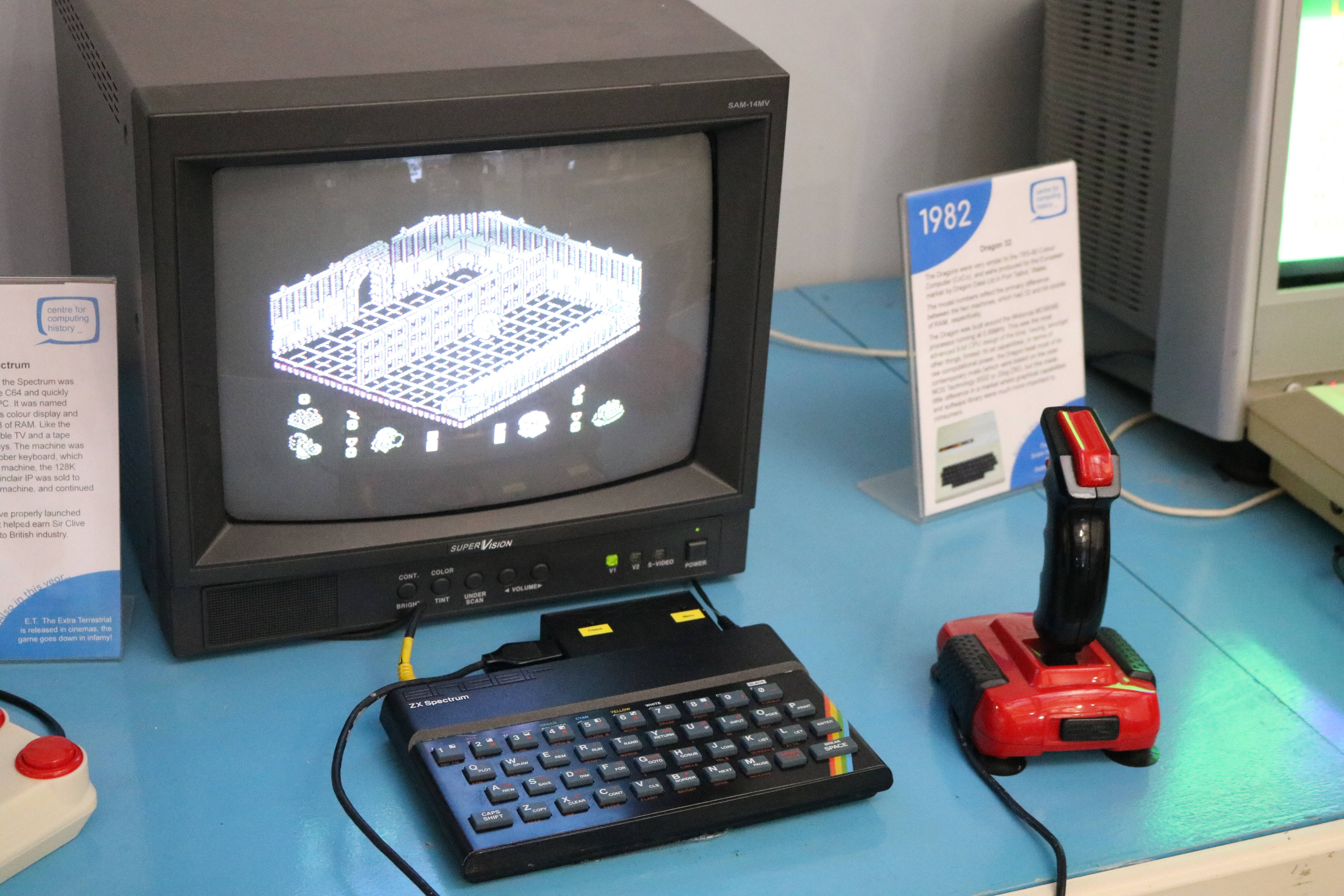
The Spectrum, launched in 1982, was a different kind of gateway. Its low-cost design and distinctive rubber keys belong to an era when a home computer could be equal parts learning tool, game console and introduction to making your own software. Loading a game from tape took patience. Sometimes it also took a second attempt. The imagination required by the artists and programmers who worked within those constraints was immense.
The Centre's own collecting and public events help preserve that story. It has held celebrations of Sinclair hardware, and Sir Clive Sinclair himself visited the museum during one of its exhibitions. Rather than pretending those old computers are only culturally important because they were commercially successful, the displays allow visitors to see what made people love them.

If pixel-art worlds, homebrew games or small independent studios mean something to you, this is one of the stories behind them. A whole generation learned how to make a world out of a handful of colours and a stubborn machine. Our guide to independent pixel-art creators is a small contemporary echo of that spirit.
From Acorn to Arm: the future hiding in an old computer
The tale doesn't end with school computer rooms. In 1985, Acorn powered up the first Arm processor. The team was searching for a simpler, more efficient way to build the brain of a computer. Sophie Wilson and Steve Furber were central to that design work. Modern Arm-based processors power an enormous range of devices; that line of development traces back to those Cambridge engineering decisions.
Then came the Acorn Archimedes in 1987, one of the earliest personal-computer families based on Acorn's own 32-bit Arm processor. It introduced a dramatically different kind of performance and graphical desktop to many British users.
Be wary of easy internet claims that it was literally the first RISC computer ever. There were earlier RISC-based systems elsewhere. Its place in the early history of Arm-powered personal computing is impressive enough without exaggerating it.
The Megaprocessor: a computer big enough to watch it think

The Megaprocessor turns something you usually cannot see into a room-sized spectacle. Instead of transistors buried invisibly inside a tiny chip, its circuitry stretches across enormous panels. Lights illuminate registers and logic operations. Suddenly the phrase 'a computer processes instructions' stops being a polite abstraction and becomes something you can follow with your eyes.
That's a surprisingly beautiful educational trick. A processor can feel like an unknowable black box. When its separate moving pieces are laid bare, computing begins to feel approachable again. Check the current displays when planning a visit, since the museum's floor and exhibitions evolve.
Yes, you can play games. No, it isn't a free arcade.
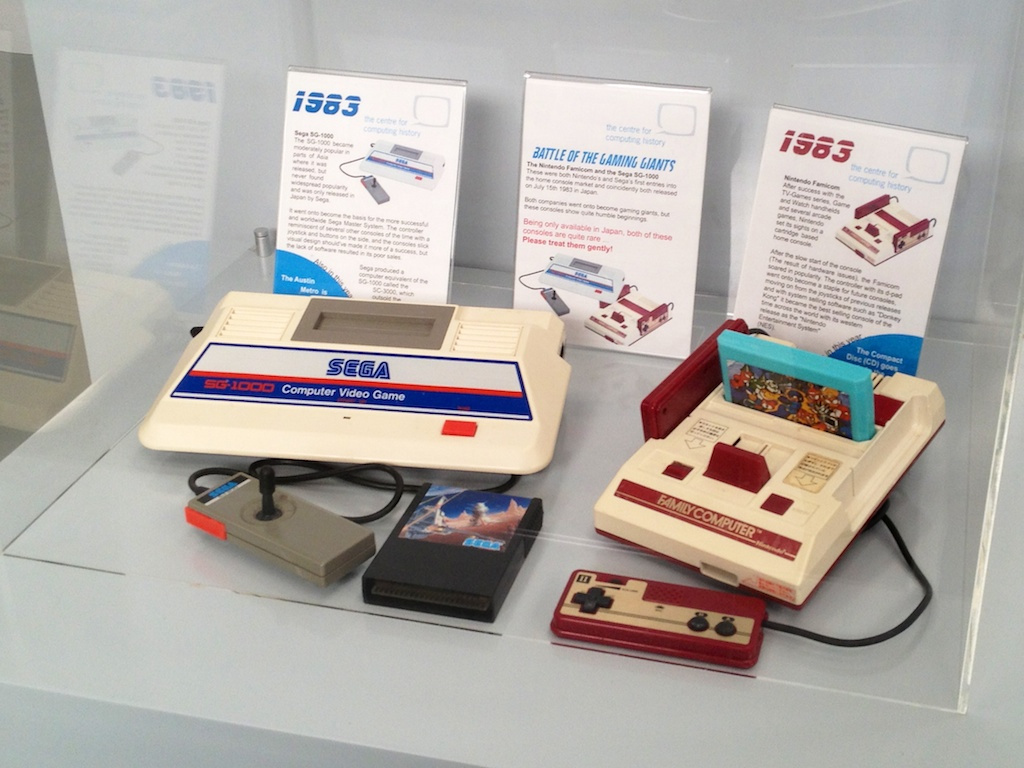
This is where the museum feels wonderfully different from a collection of vintage boxes behind ropes. It presents old consoles, computers and playable experiences, often with the original kinds of controllers or keyboards. The joy isn't necessarily finishing a level. It's discovering how a game expected players to think before convenience became a design goal.
But the museum makes its position clear: it is a museum, not an arcade. Where displays are powered on and designated for hands-on use, you may try them, but don't wrench a joystick, restart a machine without permission or assume every exhibit is playable. Some are preserved rather than running. Its educational workshops and special exhibitions are separate reasons to return.
More than nostalgia: learning to make a computer do something
There's an important difference between a game console waiting to be played and a little computer sitting at a command prompt. The former asks what you want to play. The latter asks what you want it to do. The museum's programming sessions and school workshops make that distinction tangible. Some introduce children to the BBC Micro, BASIC and microcomputers; others use newer accessible hardware such as Raspberry Pi and micro:bit. The idea isn't to convince everyone that the 1980s were better. It's to make the computer less mysterious.
Try typing a tiny program and watching it work, if a hands-on session is available during your visit. A few lines might make a shape appear or a character move. That sounds unimpressive beside a modern game, but it changes your relationship with the screen: you have made the instructions rather than merely obeyed them. Workshop availability, booking and age ranges vary, so check the museum's visitor and event information before promising a child an activity on a particular day.
The people who saved the machines
The museum's own history begins in 2006 with three friends: Jason Fitzpatrick, Elaine Symonds and Dr Lisa McGerty. Fitzpatrick had collected computing artefacts; together they imagined an institution where people could actually experience the machines that had changed everyday life. A company followed in 2007, charity status in 2009 and the Cambridge museum opened in 2013.
That origin matters. Nobody had to create a place where a child could sit in front of an old BBC Micro and discover that technology has a history. Things like this exist because people keep machines safe, repair them, catalogue them, train volunteers and make endless practical choices about what survives.
Planning a real visit
| Address | Centre for Computing History, Rene Court, Coldhams Road, Cambridge CB1 3EW. |
|---|---|
| Usual hours | Wednesday–Sunday, 10 am–5 pm in school term, last entry 4:15 pm. School holidays may have expanded opening; winter and special-event hours vary. |
| Tickets | Paid entry. Prices and concessions can change, so check the current visitor and booking page rather than relying on an outdated amount. |
| Parking | Free parking at the museum, with alternatives signposted when busy. |
| Access | Single-level open-plan exhibition, step-free visitor areas, accessible toilet and parking arrangements. Full access information. |
| Time to allow | At least two hours for curious adults; more if you enjoy testing machines and reading the history behind them. |
Don't mistake the museum's visitor timetable for an unchanging seven-days-a-week schedule. In ordinary school term time it lists Wednesday to Sunday; special holidays and closures differ. For a specific date, go directly to the museum's own visiting page.
Coming up in Cambridge: old computers, old games, and outer space
The Centre is not only a museum where objects sit waiting for somebody to read a small sign. Its events give enthusiasts a reason to bring their own stories, hardware and projects into the room. On Sunday 25 October 2026, the museum is advertising a Bring 'n Byte sale: a chance to browse and trade vintage computing equipment, games and parts. It's a selling and swapping event with its own arrangements for stallholders, not an invitation to dismantle anything from the museum's collection.
Then on 14 and 15 November 2026, the advertised Retro Computer Festival: Space Edition turns the focus to space-age computing and games. The Saturday exhibitors' programme includes versions of Super Star Trek made to run on old systems, along with an Apple I demonstrating Lunar Lander, originally a text-based game about trying to get a spacecraft onto the Moon in one piece. Think about that for a moment: the entire drama of a landing, imagined with characters on a screen and the limited vocabulary of an early computer.
There's a lovely meeting of histories here. Cambridge helped build the machines that made home computing familiar; engineers and amateur programmers used those machines to imagine travelling through space. More than forty years later, people are still rebuilding, porting and playing the games. A museum becomes a gathering of makers rather than a cemetery of dead devices.
These are dated events, not permanent daily exhibits, and ticket arrangements and exhibitors can change. Use the museum's individual booking pages before planning a journey. The Space Edition also makes a nice bridge to Calphii's Living Universe and the online planetarium guide: one is a moving, imaginative room, the other offers real star maps, while vintage lunar-landing games show what the same fascination looked like when a computer had almost nothing to draw with.
A screen can be a place worth living in
There's a lovely line from an old computer waiting for a BASIC command to a modern browser that you can shape yourself. Both let you make something rather than simply scroll whatever somebody else decided to show you. Calphii's Visuals allows a workspace to have its own retro room and widget styling; its Pixel Pet and little animated Fire Side are playful details rather than a system-wide desktop pet or a museum emulator.
That same spirit of making a digital space your own is part of Calphii, where music, tasks and atmosphere come together in a room you can shape. If you love the original creators' imagination, read our indie games profile too.
Why keep these computers working?
A digital photograph of an old machine can show you its shape. It cannot show you how the keyboard feels, how long a game takes to load or how satisfying a first line of code can be. Working computers preserve something that specifications don't: the pace of the experience. The difference between having to ask the machine for something and having everything appear before you've decided you want it.
The Centre for Computing History offers that rare permission to touch the past. For anyone who has ever spent too long staring at a screen, it is a remarkable place to remember how inventive, awkward, hopeful and profoundly human the story of the screen really is.