Somewhere above your roof is an entire moving map of planets, stars and constellations. You don't need to buy a telescope to begin understanding it. You don't even need a clear night. Some of the most wonderful astronomy tools live inside an ordinary browser tab, ready to take you from tonight's sky to the edge of a galaxy.
There is just one problem with the usual 'best online planetarium' lists: they tend to lump three very different experiences together. A star map tells you where to look tonight. A solar-system simulation lets you fly past planets and spacecraft. An astronomical atlas shows images collected by actual observatories. All three are worth visiting, but which one you want depends on the question you came with.
Here are six real, free places to explore. Some are startlingly beautiful; some are practical enough to take outside; and one is an older little open-source project that deserves not to be forgotten.
Choose your first window into the universe
What's above my house tonight? Start with Stellarium Web or Timeanddate. I want to fly past planets. Pick NASA Eyes. Show me real galaxies and nebulae. Head to ESASky or WorldWide Telescope. I enjoy simple open web projects. Try VirtualSky.
| Tool | What you're seeing | When to use it |
|---|---|---|
| 1. Stellarium Web | A realistic view of the sky above you | Start here if you want tonight's stars |
| 2. NASA's Eyes on the Solar System | A moving 3D tour of planets and spacecraft | Go here when you want a real space adventure |
| 3. WorldWide Telescope | A giant atlas of astronomical imagery | For people who want to disappear into nebulae and galaxies |
| 4. Timeanddate Night Sky Map | A practical map of what your location can see | Use it before stepping outside with a coat and a pair of binoculars |
| 5. ESASky | Real scientific sky surveys and public astronomy data | When you want to get close to the real telescope imagery |
| 6. VirtualSky by Las Cumbres Observatory | A simple, configurable sky chart for any location | For a lightweight chart and curious tinkerers |
01 / 06 · Start here if you want tonight's stars
Stellarium Web

What you'll exploreA realistic view of the sky above you
Best forStart here if you want tonight's stars
One thing to knowThe web version is simpler than Stellarium's downloadable desktop software.
Open the official tool ↗Sometimes you look up on the way home and see a star that looks almost too bright to be a star. Stellarium is the website I'd open first. Set your location, adjust the date and time, then look in roughly the same direction as the real sky. The constellations can become names and outlines rather than a confusing scatter of dots.
There's something quietly powerful about moving the clock forward and watching the sky turn. You can see how the planets change position, switch constellation artwork or labels on and off, and move from the glow of the horizon to a sky full of stars. It looks beautiful even if your primary interest is finding your way around rather than learning astronomy terminology.
Stellarium is also a substantial open-source desktop project, but don't assume every feature listed on its main website exists in the simpler browser edition. You don't need to download that desktop app for the web star map linked here. Give the sky time to load on slower connections, and remember that a simulated sky is not a live camera feed.
02 / 06 · Go here when you want a real space adventure
NASA's Eyes on the Solar System
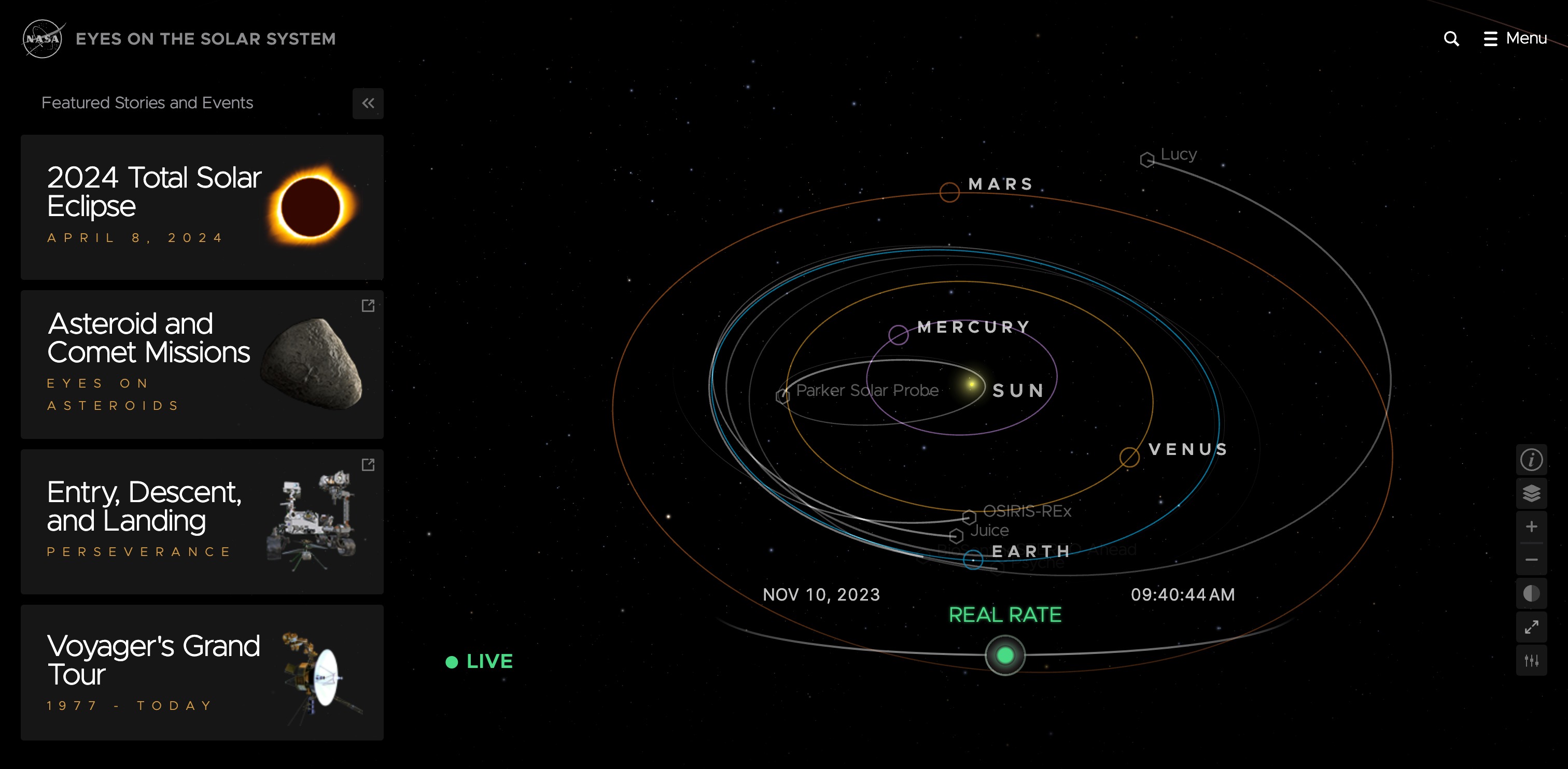
What you'll exploreA moving 3D tour of planets and spacecraft
Best forGo here when you want a real space adventure
One thing to knowIt's a simulation based on mission data, not the view out of your window tonight.
Open the official tool ↗There is a point at which a star map stops being enough. You don't just want to know where Saturn is. You want to leave Earth, glide past its rings, and follow the spacecraft that have actually travelled through our solar system. NASA's Eyes makes that curiosity feel wonderfully immediate.
It is a free suite of browser-based 3D experiences. The Solar System tool uses NASA mission data and lets you move through time, explore planets and moons, and follow the journeys of spacecraft such as Voyager and Cassini. NASA describes a simulation window reaching from 1950 to 2050. It's not a video made once and pressed into a page; the models respond as you explore.
The important difference is that you're looking at a data-driven recreation, not somebody's telescope or a live broadcast from a probe. That's exactly what makes it possible to revisit old missions. If the star map above helps you understand the ceiling over your head, NASA Eyes reminds you how much is going on beyond it.
03 / 06 · For people who want to disappear into nebulae and galaxies
WorldWide Telescope

What you'll exploreA giant atlas of astronomical imagery
Best forFor people who want to disappear into nebulae and galaxies
One thing to knowA richer interface and internet connection help; a little orientation makes the first visit easier.
Open the official tool ↗WorldWide Telescope is what I'd send to somebody who has looked up one photograph of a nebula and is now fifty tabs deep, asking how the universe can possibly contain so much. Instead of viewing isolated pictures, you move around a map built from astronomical surveys, zooming towards regions that contain galaxies, clusters and wonderfully strange glowing clouds.
The project is associated with the American Astronomical Society and provides a real web client. It draws on imagery and curated material, so the experience differs from a rendered view of the sky above your garden. You can explore more like a visitor in a vast illustrated atlas than an observer pointing out what to look for after sunset.
There is more to learn here than in a simple star wheel. If you arrive expecting an instant screensaver, the controls and layers can be a little much. Try beginning with one object you've always liked, such as the Andromeda Galaxy, then zoom out and let the surrounding sky become a place rather than a single photograph.
04 / 06 · Use it before stepping outside with a coat and a pair of binoculars
Timeanddate Night Sky Map

What you'll exploreA practical map of what your location can see
Best forUse it before stepping outside with a coat and a pair of binoculars
One thing to knowVisibility estimates don't account for local weather or light pollution.
Open the official tool ↗This one is less of a dreamy exploration and more of a very useful friend who knows exactly where the planets are. Pick your location and time, then see which objects are above your horizon and where to look. You can follow the arc of a planet across the evening or work out whether the bright point next to the Moon is a planet at all.
The site explains its visibility ratings unusually carefully. Those ratings consider the position of an object relative to the Sun and horizon and its brightness, but they cannot tell whether clouds are covering your street, whether a bright streetlamp is shining directly into your eyes, or whether a nearby building hides the horizon. Don't confuse a green visibility indicator with a weather forecast.
If you're trying to identify a specific bright object, this practical map may be more immediately useful than a magnificent 3D planetarium. It's particularly good for the moment just before you go outside, and it runs on mobile as well as desktop, with some device-specific controls.
05 / 06 · When you want to get close to the real telescope imagery
ESASky

What you'll exploreReal scientific sky surveys and public astronomy data
Best forWhen you want to get close to the real telescope imagery
One thing to knowThe Science mode is information-dense; beginners should choose Explorer.
Open the official tool ↗ESASky is a different sort of beautiful. You don't arrive to see a decorative cartoon of Saturn. You arrive among genuine astronomical images and data: stars, galaxies, clouds of gas and objects with names that look as though they were written for people who already know the sky very well. Then you realise you can search for an object and actually move across those surveys yourself.
The European Space Agency offers an Explorer mode for casual visitors and a more involved Science mode. Explorer is the right first door for someone who wants to find the Andromeda Galaxy or the Crab Nebula without learning a research interface first. You can go deeper later if the questions start accumulating.
Here the curiosity shifts from finding tonight's constellations to exploring what telescopes reveal about deep space. ESASky opens up observations of places like the Crab Nebula, with colours and overlays that help bring otherwise invisible details into view.
06 / 06 · For a lightweight chart and curious tinkerers
VirtualSky by Las Cumbres Observatory

What you'll exploreA simple, configurable sky chart for any location
Best forFor a lightweight chart and curious tinkerers
One thing to knowAn older open-source project whose maintainer no longer promises support.
Open the official tool ↗VirtualSky takes a more modest approach. There isn't a dramatic journey through spacecraft or a thousand layers of imagery. There is a chart of the stars, with planets and constellations, and a series of controls that let you make it suit a particular location or time. It's the kind of internet project you could spend a pleasant half-hour exploring and then show to a friend who makes websites.
It was originally built at Las Cumbres Observatory and can be embedded in educational and non-profit websites. You can adjust the display, time, projection, constellation labels and other details. The project is still useful for teaching what the sky is doing, especially if you want to understand how planetarium visuals are built.
There is an honest caveat: the long-time maintainer describes the repository as provided as-is and doesn't promise support. This is not my first recommendation for a newcomer with a modern high-resolution screen, but it deserves to be here as a beautifully straightforward little corner of astronomy's open web.
A tiny stargazing adventure for tonight
Pick a time after sunset in Stellarium Web and set your real location. Look west, east and overhead in the sky map until you recognise one bright object or one constellation. Before you leave, check the same object's visibility in Timeanddate. Then, if the real sky is clear, go outside for five minutes and try to find it. You don't need to memorise ten names. Finding even one thing by yourself is a lovely feeling.
If the sky is cloudy, don't call the trip off. Open NASA Eyes and travel to Saturn, or look up the Crab Nebula in ESASky. One tool helps you understand where we are. The other reminds you of how much there is beyond our view.
Is this a live picture of space? Not in the webcam sense. Planetariums show calculated positions and renderings; sky atlases show collected telescope imagery and data, sometimes enhanced or combined. The distinction is what makes them both educational and astonishing.
A different sky for different evenings
One unexpected pleasure of exploring these astronomy sites is noticing how the real sky changes through an evening. Calphii has a small echo of that idea: its optional Night Shift starts gently dimming and warming your Calphii world after sunset, using local sunrise and sunset information when available, or a simple local-time schedule otherwise. It's a way of letting your own browser room settle as the day changes.
And Living Universe isn't the only celestial mood inside Visuals. Aurora Threads brings slow ribbons of light; Solar Bloom adds occasional glowing flares; Deep Space Drift gives you just a scattering of stars. Choose whichever Calphii Vibe you want to spend a rainy night inside.
There's no hurry to get back to Earth
You can spend twenty minutes here without trying to learn an entire subject. Discover a constellation, follow the path of a spacecraft or simply marvel at the galaxy you didn't know existed. We believe a browser can be more than a row of tasks and urgent tabs. If you feel the same, Calphii’s Living Universe gives you an ever-changing cosmic backdrop while the ordinary bits of your workspace stay close by. Our calm digital workspace guide explores the rest of the room.