There was a time when a desktop aquarium seemed like the height of computer luxury. Open the family PC, let the screen go idle and suddenly there's a tank of glittering fish where the spreadsheet used to be. The fish moved with a mysterious sense of purpose. Occasionally a bubble rose. That was quite enough.
The little fish tanks haven't vanished. You can find them in ordinary browser tabs now, and some are rather beautiful. But the search results muddle together three different things: ambient fish screens you can simply leave alone, pet games with growing and feeding, and interactive toys where the fun is making a tank yourself. One reader might love a feeding button; another wants precisely zero new responsibilities, even fictional ones.
These six real projects cover that whole spectrum. None of them is an actual tank with live video of real fish. If that's what you're after, look for aquarium live streams instead. Here the appeal is an invented little world that doesn't ask you to clean its water on Sunday.
Which sort of tank do you need?
Just watch: Polyquarium or Jasper's Aquarium Screensaver. Fish that grow without ever dying: WebScreen. Pick your fish and use water sounds: ZumaTools. Fish drawn by strangers: Drawafish. A whole miniature ecosystem to manage: Bokaldo.
| Tank | Sign-up | Care needed |
|---|---|---|
| 1. Polyquarium | No account | Optional feeding; fish don't require daily care |
| 2. WebScreen Aquarium Simulator | No sign-up, free | Six optional food pinches per day; no starvation or death |
| 3. ZumaTools Virtual Aquarium | Free; no sign-up advertised | Optional fish feeding and restocking |
| 4. Jasper Bernaers' Aquarium Screensaver | Free; no account | No feeding or progression required |
| 5. Drawafish | Free according to project directory | Make a doodle if you like, or just watch the community fish |
| 6. Bokaldo | Browser-based; check save/account features when playing | Feed, manage conditions, change water and design tanks |
01 / 06 · Best simple fish tank, no login
Polyquarium

AccountsNo account
Care levelOptional feeding; fish don't require daily care
Where it livesModern phone and desktop browsers with Canvas
Open the aquarium ↗If your idea of a digital aquarium is 'open a tab, see some fish, get on with my day', Polyquarium makes a very good first stop. Stephen Younts' little tank has freshwater fish, a pearl gourami that swims among them, and even a small crab wandering about on the bottom. The fish don't follow a scripted video loop; they swim, drift into groups, turn toward open water and briefly gather when you tap the glass to feed them.
There are a few unusually thoughtful controls. Change the number of fish, turn their swimming pace down, switch between day and night, or hide the interface in Immerse mode. It explicitly supports reduced-motion settings and pauses its work while the tab is hidden. Feeding here is play, not an obligation. One important limit: browser fullscreen is not an operating-system screensaver, and Polyquarium won't automatically appear after your computer goes idle.
02 / 06 · Best for fish that grow, with zero guilt
WebScreen Aquarium Simulator

AccountsNo sign-up, free
Care levelSix optional food pinches per day; no starvation or death
Where it livesBrowser, fullscreen available
Open the aquarium ↗WebScreen adds a small reason to revisit without inventing a punishment for missing a day. You start with little fish and can feed them six pinches each day; the fish get bigger as they eat. If you forget them for a month, they keep their progress and none die or become sick. For anyone scarred by a digital pet who guilt-tripped them for having an actual life, this matters more than it sounds.
The reef scene includes fish that school together, underwater lighting and a day/night switch. The site says growth progress remains in your local browser storage rather than an online account. That's both nice for privacy and worth understanding if you clear your browser data. This one is slightly more of an idle game than a pure ambient screen, but it never demands you spend those daily feeds.
03 / 06 · Best to choose your own fish
ZumaTools Virtual Aquarium

AccountsFree; no sign-up advertised
Care levelOptional fish feeding and restocking
Where it livesBrowser, fullscreen, optional screen wake lock
Open the aquarium ↗ZumaTools hands you the stocking list. Want a modest school of neon tetras and a single angelfish? Or a busier mix with clownfish, goldfish and blue tangs? You can adjust quantities, watch fish travel around the tank, drop food and switch bubbling sound on or off. It has a satisfyingly practical 'make this my tank' feel without sending you into a complicated account setup.
There's an optional Keep Screen Awake feature in fullscreen, which is useful if you're turning an unused monitor into a living picture. Use it intentionally: keeping the display awake uses power and isn't necessary for a short break. Although the fish are stylised, mixing marine and freshwater species in a digital illustration is not guidance for stocking a real aquarium.
04 / 06 · Best hands-off second-monitor background
Jasper Bernaers' Aquarium Screensaver

AccountsFree; no account
Care levelNo feeding or progression required
Where it livesDesktop, mobile and modern browsers; fullscreen
Open the aquarium ↗This is the purest 'let it be a screensaver' option of the lot. Four preset moods, Tropical, Deep Blue, Reef and Night, change the look of the tank. You can slow the fish down, make the bubbles less busy or switch light rays and plants on and off. If you like having something move in the edge of your vision while you sketch, it is nice to be able to make the movement almost imperceptible.
There's no pet-management drama here: the interface is about colour, swimming speed, size and an uncluttered fullscreen display. The site uses HTML5 Canvas and doesn't need downloading. Just remember that this is a webpage, not an installed sleep/lock screen. Your browser and device need to remain open for it to keep swimming.
05 / 06 · Best for an aquarium made of people's drawings
Drawafish
AccountsFree according to project directory
Care levelMake a doodle if you like, or just watch the community fish
Where it livesBrowser-based drawing and shared tank
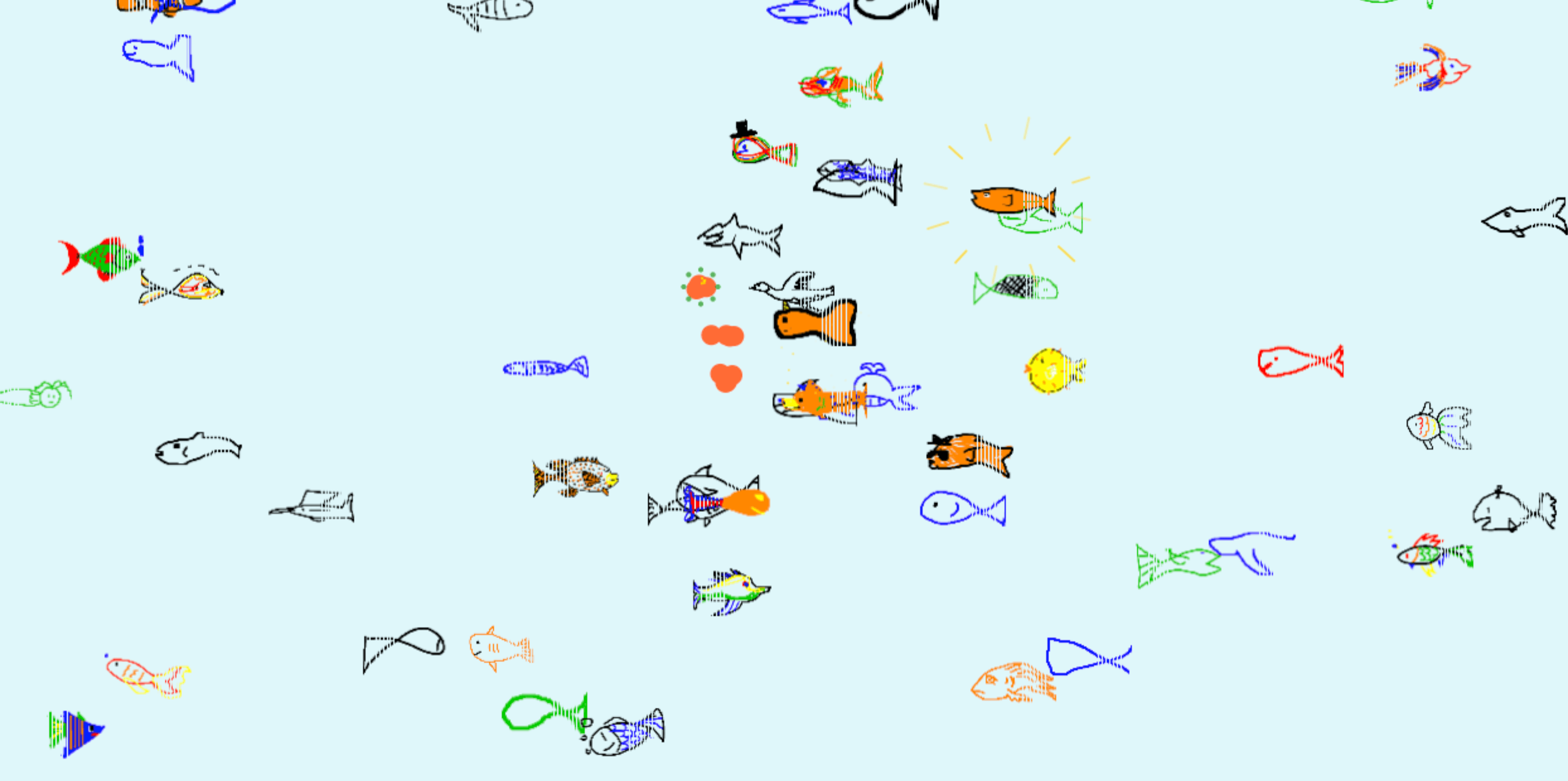
Open the aquarium ↗Some tanks are full of polished glowing reef fish. Drawafish is full of wobbly little creatures made by actual people, and it's delightful in a completely different way. You draw a fish, the site checks whether it recognises the sketch as a fish, and successful drawings join a shared aquarium with other people's odd and wonderful creations. One might look like a tropical beauty; another has the unmistakable spirit of an anxious potato.
This is a community artwork rather than a serious fish simulator, and it uses an AI model to recognise the drawings. You can also interact with the tank, vote on creations and explore what people have submitted. For a gentler background scene, Jasper or Polyquarium is an easier place to start.
06 / 06 · Best if you actually want an aquarium game
Bokaldo

AccountsBrowser-based; check save/account features when playing
Care levelFeed, manage conditions, change water and design tanks
Where it livesWeb on computer, tablet and mobile
Open the aquarium ↗Bokaldo is what you open when you want to cross the line from watching a tank into managing one. It advertises a 3D aquarium, feeding, adjusting water temperature and lighting, arranging multiple aquariums and swimming from a fish's perspective. It looks much more hands-on than a decorative screen and that can be exactly the right sort of winding-down activity.
The catch is also the pitch: there are more decisions to make, and a system that simulates an ecosystem is not the same thing as a peaceful moving picture. If you only want fish drifting through the corner of a second display, start elsewhere. And because the site advertises saving and sharing features, check what registration or storage it currently requires before you build anything elaborate.
Will a browser aquarium stay on all afternoon?
A browser animation isn't magic wallpaper. It can pause when the tab is hidden, or stop when the laptop sleeps. Fullscreen usually takes over the current screen but does not install a screensaver on your computer. Some websites include a Wake Lock option that can keep a display awake while the page is visible. If you are leaving an aquarium playing while you step away, think about battery life, screen burn-in for long static UI elements, and whether you really need it running for hours.
A little companion for your own workspace
What I like about these projects is that none of them needs to help you achieve anything. A fish can be interesting just because it turns around a plant. If you want a similar little bit of life inside a workspace, rather than a separate fish-tank tab, Calphii has Pixel Pet, a small animated companion that wanders among the widgets. It brings a little company to your screen. You can also layer gentle audio through the ambience mixer if you want the room to feel softer.
My choice for an uncomplicated afternoon would be to start with Polyquarium, turn the fish speed down, and see if you even remember to look at it. That's when a background aquarium is doing its job: it's nice to be there, but you're never required to pay attention.