The first time you hear a station emerge from shortwave static, it feels strangely different from pressing play on a podcast. You're hearing something picked up by a real antenna somewhere in the world: an imperfect, fading signal that might vanish the next time you tune in. It hasn't been tidied up into a streaming catalogue. It has travelled through the air.
You don't actually need to buy a radio to hear it. Some enthusiasts and universities let visitors operate a receiver over the web. They are called WebSDRs or KiwiSDRs, with SDR standing for software-defined radio. Your browser sends tuning instructions to the remote receiver, then streams back what its antenna hears. That's different from Radio Garden, where you browse ordinary internet radio streams from stations around the globe. Both are lovely, but they're not the same technology.
A recent r/shortwave discussion makes exactly this point to newcomers: start by exploring a web receiver before spending money on hardware. The first listen can be slightly bewildering, though. Here are the links and a gentle way in.
Start with the real radio, then find a signal
| Place | What it is | First step |
|---|---|---|
| 1. University of Twente WebSDR | A famous real receiver in the Netherlands | Tune frequencies across much of the HF range; AM for broadcasters |
| 2. WebSDR.org | Find other people's receivers around the world | Choose a receiver and check its supported frequencies |
| 3. Receiverbook | A more browsable directory of online receivers | Filter by receiver type, location, bands and public access |
| 4. Short-Wave.info | Find something to listen for, rather than guessing | Search by language, station or time in UTC to find a frequency |
01 / 04 · A famous real receiver in the Netherlands
University of Twente WebSDR
AccessFree public receiver; HTTP-only connection
First moveTune frequencies across much of the HF range; AM for broadcasters
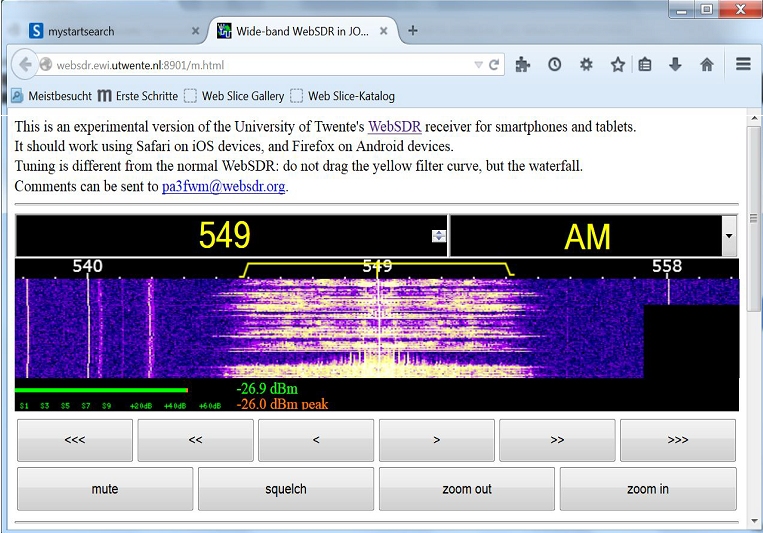
Visit University of Twente WebSDR ↗Imagine turning a dial in the Netherlands while sitting at your desk in Ely, Glasgow or Toronto. That's what Twente's WebSDR lets you do. There is physical receiving equipment and an antenna at the University of Twente. You're controlling the frequency through a website and hearing what that receiver picks up. When the frequency changes, the sound does too. Sometimes you land on recognisable speech or music, and sometimes you land on nothing but a rough, breathing stretch of static.
The colourful waterfall display is a map of activity, not a music visualiser. Bright vertical marks can help you find a station, and the frequency field is where you enter a number in kHz. Its older WebSDR installation is famously accessible to many simultaneous users, but the published address is HTTP rather than HTTPS and might be blocked or warned about by modern browser security settings. Don't ignore a browser warning to make this work; try the other directories below if your browser refuses access.
02 / 04 · Find other people's receivers around the world
WebSDR.org

AccessFree directory, individual receivers run by volunteers
First moveChoose a receiver and check its supported frequencies
Visit WebSDR.org ↗The joy of remote radio is that you aren't limited to one antenna in one country. A shortwave signal that's barely audible from the Netherlands may be strong near its transmitter. WebSDR.org is the older, wonderfully unfussy place to find community receivers. Some cover broad chunks of shortwave; some cover one amateur band. They are not identical. An online receiver in Utah and one in England will give you different slices of the air.
You may run into offline links or old HTTP websites. Those are real limitations of this volunteer-run world, and they are a good reason to browse the directory rather than promise any one receiver will work forever. Check what each receiver covers before trying a frequency, avoid entering personal details into unfamiliar pages, and never bypass a certificate or security warning merely because a directory links there.
03 / 04 · A more browsable directory of online receivers
Receiverbook

AccessFree directory; receiver access varies
First moveFilter by receiver type, location, bands and public access
Visit Receiverbook ↗Receiverbook is a better starting point if the word 'waterfall' sounds like a hiking trip rather than radio software. Instead of guessing URLs, you can browse real receiver listings and see the equipment type and location before opening one. The catalogue includes KiwiSDR, WebSDR and OpenWebRX stations, including receivers in Bedford, New Zealand and elsewhere.
Some linked receivers only cover particular bands, and some may show that tuning is restricted or require you to ask first. Publicly listed does not always mean unlimited use. Receiverbook is a map to radios, not a radio itself. That distinction saves a surprising amount of head-scratching.
04 / 04 · Find something to listen for, rather than guessing
Short-Wave.info
AccessFree reference; doesn't play radio audio
First moveSearch by language, station or time in UTC to find a frequency
Visit Short-Wave.info ↗Here's the part beginners often miss. A receiver is only half the puzzle. Once you know how to tune it, what frequency should you actually type? Short-Wave.info maintains a searchable database of broadcast schedules, with languages, times, transmitter sites and frequencies in kilohertz. Instead of spinning the dial until something appears, you can decide to look for a particular language or part of the world.
Schedules are plans, not promises. Shortwave changes with time of day, propagation, season and transmitter conditions; an online receiver also has its own geographic limitations. Some databases are more recently updated than others, so compare against a broadcaster's current schedule where available. And note that a schedule site is not an audio player: open a receiver in another tab, then tune the listed frequency there.
Your first ten minutes on a shortwave receiver
First find a receiver whose web page you can open safely and whose frequency range includes the broadcasts you want. If you're using a frequency schedule, pick a station listed for the current UTC hour rather than the hour shown on your kitchen clock. A common stumbling block is mistaking megahertz for kilohertz: 9.5 MHz is 9500 kHz. Many WebSDR tuning boxes expect kHz.
Next, type the frequency. For an ordinary international shortwave broadcast, select AM. You can then adjust volume, and sometimes the filter width, until the voice becomes a little clearer. USB and LSB are sideband modes often used by amateur radio operators; selecting them for a normal AM broadcaster can make familiar voices sound oddly distorted. Listen for a minute before moving on. Signals often fade and recover.
The coloured waterfall shows where energy is arriving at the antenna. Strong, neat lines can be signals, but not every visible line is speech. Some are digital transmissions, interference or carriers without intelligible audio. And no, you don't need to decode everything. Half the pleasure is an unexpected station bursting into life.
Why isn't the station I looked up there?
Shortwave is affected by the ionosphere, day and night, solar conditions, transmitter locations and the receiver's antenna. A station scheduled at 9000 kHz doesn't necessarily reach every listening position. The public receiver might also be full, offline or tuned outside its supported range. Try a receiver on a different continent before concluding the station disappeared. The internet doesn't remove shortwave's unpredictability; it simply lets you borrow another pair of ears.
A quiet listening corner
If you fall for the sound of distant radio, it's a lovely activity for an evening when you don't want another algorithmically selected playlist. Open the receiver, keep a notebook of stations you find, and give yourself permission to listen to the static for a moment. You can keep a note of your discoveries in Calphii while listening in another tab, and settle back into your favourite ambience when you're finished tuning. Just avoid layering extra audio over a faint broadcast you're actually trying to hear.
Somewhere, an antenna is picking up a voice you've never met. Sometimes all you need is the right frequency.